Collecting Data with R and Python
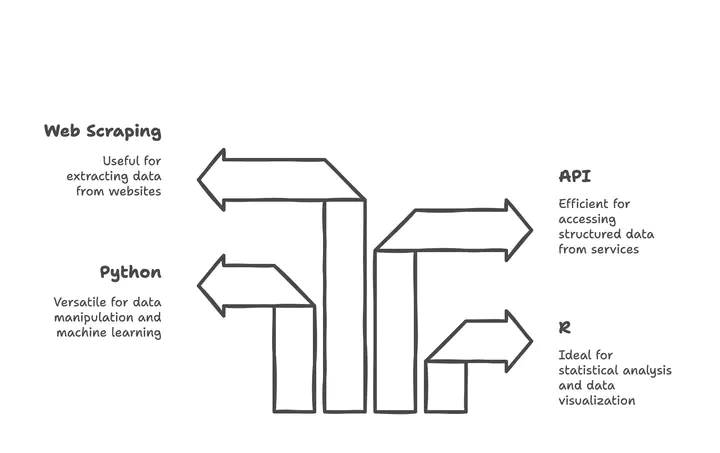
Your Markdown content
Outline
- Modern Data Repositories
- World Bank Indicators
- R/Python Data Collection Tools
- Web Scraping Techniques
- API Integration
- COVID-19 Data Sources
Modern Data Repositories
Major Public Data Repositories
- Data.gov - The U.S. Government’s open data site
- Over 308,000 datasets available
- Tools and resources for research, visualization, and application development
- https://data.gov
- GitHub Public APIs - Collective list of free APIs
- Categorized by domain (finance, health, science, etc.)
- Documentation on authentication and usage
- https://github.com/public-apis/public-apis
- Kaggle - Platform for data science competitions and datasets
- Thousands of datasets across various domains
- Community-contributed notebooks and code examples
- https://www.kaggle.com/datasets
Government and Institutional Data Sources
- U.S. Census Bureau - Comprehensive demographic data
- Economic indicators, population statistics, geographic data
- Multiple APIs for different data categories
- https://www.census.gov/data/developers/data-sets.html
- Eurostat - Statistical office of the European Union
- Economic, social, and environmental data for EU countries
- Structured by themes (economy, population, environment)
- https://ec.europa.eu/eurostat/data/database
- UN Data - United Nations data portal
- Global statistics on population, economics, environment
- Data from UN specialized agencies
- https://data.un.org
World Bank Indicators
World Bank Development Indicators
- A comprehensive collection of development data through web API
- Covers over 200 economies with 1,400+ time series indicators
- Categories include:
- Economic Policy & Debt
- Education
- Environment
- Financial Sector
- Health
- Infrastructure
- Social Development
- Original Website: https://databank.worldbank.org
Data from the World Bank Website
- Sign up at https://databank.worldbank.org
- Search by keywords or Indicator name
- Filter by country, year, and indicator
- Download data in various formats (CSV, Excel, XML, JSON)
- API access available for programmatic data retrieval
WDI Data with R
# Install the WDI package if needed
# install.packages("WDI")
library(WDI)

# Search for GDP-related indicators
indicators <- WDI::WDIsearch('gdp')
head(indicators)
#       indicator            name
# [1,] "5.51.01.10.gdp"     "Per capita GDP growth"
# [2,] "6.0.GDP_current"    "GDP (current $)"
# [3,] "6.0.GDP_growth"     "GDP growth (annual %)"

# Retrieve GDP per capita data for selected countries
gdp_data <- WDI(indicator='NY.GDP.PCAP.KD',
                country=c('MX','CA','US','DE','JP'),
                start=2010, end=2023)

# View the first few rows
head(gdp_data)
WDI Data with Python
# Install the wbdata module if needed
# pip install wbdata pandas matplotlib

import wbdata
import pandas as pd
import matplotlib.pyplot as plt
from datetime import datetime

# Check available data sources
sources = wbdata.get_source()
print(f"Number of data sources: {len(sources)}")

# Get indicators from source 1 (World Development Indicators)
# wbdata.get_indicator(source=1)

# Get GDP per capita for selected countries
countries = ['USA', 'CHN', 'DEU', 'JPN', 'GBR']
indicator = {'NY.GDP.PCAP.CD': 'GDP per capita (current US$)'}

# Set date range
data_date = (datetime(2010, 1, 1), datetime(2023, 1, 1))

# Retrieve the data
df = wbdata.get_dataframe(indicator, country=countries,
                         data_date=data_date)

# Reshape data for plotting
df = df.reset_index()
data_pivoted = df.pivot(index='date',
                       columns='country',
                       values='GDP per capita (current US$)')

# Plot the data
data_pivoted.plot(figsize=(10, 6))
plt.title('GDP per Capita Comparison')
plt.ylabel('Current US$')
plt.grid(True)
R/Python Data Collection Tools
The Tidyverse Ecosystem in R
- Tidyverse - Collection of R packages designed for data science
- Consistent design philosophy and API
- Install with:
install.packages("tidyverse") - Load with:
library(tidyverse)
- Core Tidyverse Packages for Data Collection:
readr- Fast and friendly way to read rectangular datahttr- Tools for working with HTTPrvest- Web scraping simplifiedjsonlite- JSON parsing and generationxml2- XML parsing and generation
- Specialized Data Import Packages:
readxl- Excel files (.xls and .xlsx)haven- SPSS, Stata, and SAS datagooglesheets4- Google Sheets via APIDBI- Database connections
Python Data Collection Libraries
- Data Reading and Manipulation:
pandas- Data analysis and manipulationnumpy- Numerical computingpolars- Fast DataFrame library (alternative to pandas)
- API Interaction:
requests- HTTP library for API callshttpx- Next generation HTTP clientaiohttp- Asynchronous HTTP client/server
- Data Formats:
json- JSON encoding and decodingcsv- CSV file reading and writingopenpyxl- Excel file manipulationPyYAML- YAML parsing and emission
Example: Data Collection with Python Pandas
import pandas as pd
import requests
from io import StringIO

# Example 1: Reading from CSV URL
url = "https://raw.githubusercontent.com/datasets/gdp/master/data/gdp.csv"
df = pd.read_csv(url)
print(f"Data shape: {df.shape}")
print(df.head())

# Example 2: Reading from API with JSON response
api_url = "https://api.exchangerate-api.com/v4/latest/USD"
response = requests.get(api_url)
data = response.json()
rates = data['rates']

# Convert to DataFrame
currencies_df = pd.DataFrame(list(rates.items()),
                            columns=['Currency', 'Rate'])
print(currencies_df.head())

# Example 3: Reading Excel files
# df_excel = pd.read_excel("data.xlsx", sheet_name="Sheet1")

# Example 4: Reading from databases
# from sqlalchemy import create_engine
# engine = create_engine('sqlite:///database.db')
# df_sql = pd.read_sql("SELECT * FROM table_name", engine)
FiveThirtyEight and Other Data Packages
-
FiveThirtyEight - Data journalism and statistical analysis
- Data available at: https://data.fivethirtyeight.com/
- GitHub repository: https://github.com/fivethirtyeight
- R package:
fivethirtyeight - Python access via GitHub API
-
Other Specialized Data Packages:
gapminder- Data about world developmentnycflights13- Airline on-time data for NYCpalmerpenguins- Size measurements for penguinsLahman- Baseball databasebabynames- US baby names from the SSA
-
Finding Available Datasets in R:
> data(package = .packages(all.available = TRUE))
Web Scraping Techniques
Modern Web Scraping Libraries in Python
BeautifulSoup - HTML/XML parsing library - Easy to use for
beginners - Works with various parsers - 10M+ weekly downloads -
pip install beautifulsoup4
Scrapy - Full-featured web crawling framework - High performance -
Built-in support for extraction - Handles JavaScript with Splash -
pip install scrapy
Selenium - Browser automation tool - Handles JavaScript-rendered
content - Simulates user interactions - Works with multiple browsers -
pip install selenium
Playwright - Modern browser automation - Supports Chrome, Firefox,
Safari - Faster than Selenium - Handles modern web features -
pip install playwright
Web Scraping Libraries Comparison
| Library | Ease of Use | Performance | JS Support | Anti-Detection |
|---|---|---|---|---|
| BeautifulSoup | ✓✓✓ | ✓✓ | ✗ | ✗ |
| Scrapy | ✓ | ✓✓✓ | ✗ | ✓ |
| Selenium | ✓✓ | ✓ | ✓✓✓ | ✓ |
| Playwright | ✓✓ | ✓✓ | ✓✓✓ | ✓✓ |
| Requests-HTML | ✓✓✓ | ✓✓ | ✓ | ✗ |
| LXML | ✓ | ✓✓✓ | ✗ | ✗ |
Key Considerations: - JavaScript rendering requirements - Anti-bot detection measures on target sites - Performance needs (speed vs. resource usage) - Complexity of the target website
BeautifulSoup Example
import requests
from bs4 import BeautifulSoup

# URL to scrape
url = "https://quotes.toscrape.com/"
response = requests.get(url)

# Create BeautifulSoup object
soup = BeautifulSoup(response.text, 'html.parser')

# Extract all quotes and authors
quotes = []
for quote in soup.select('.quote'):
    text = quote.select_one('.text').get_text()
    author = quote.select_one('.author').get_text()
    tags = [tag.get_text() for tag in quote.select('.tag')]

    quotes.append({
        'text': text,
        'author': author,
        'tags': tags
    })

# Print the first 3 quotes
for i, quote in enumerate(quotes[:3]):
    print(f"Quote {i+1}: {quote['text']}")
    print(f"Author: {quote['author']}")
    print(f"Tags: {', '.join(quote['tags'])}")
    print('-' * 50)
Selenium Example for Dynamic Content
from selenium import webdriver
from selenium.webdriver.chrome.service import Service
from selenium.webdriver.common.by import By
from selenium.webdriver.chrome.options import Options
from webdriver_manager.chrome import ChromeDriverManager
import time

# Set up Chrome options
chrome_options = Options()
chrome_options.add_argument("--headless")  # Run in headless mode
chrome_options.add_argument("--no-sandbox")
chrome_options.add_argument("--disable-dev-shm-usage")

# Initialize the Chrome driver
driver = webdriver.Chrome(
    service=Service(ChromeDriverManager().install()),
    options=chrome_options
)

# Navigate to a dynamic website
driver.get("https://www.nasdaq.com/market-activity/stocks/aapl")

# Wait for JavaScript to load content
time.sleep(5)

# Extract stock price
try:
    price_element = driver.find_element(By.XPATH,
        "//span[contains(@class, 'last-price')]")
    price = price_element.text
    print(f"Current AAPL stock price: {price}")
except Exception as e:
    print(f"Error extracting price: {e}")

# Clean up
driver.quit()
Web Scraping in R with rvest
- rvest - Web scraping package inspired by Python’s BeautifulSoup
- Part of the tidyverse ecosystem
- Simple and consistent syntax
- Works well with the pipe operator (%>%)
- Install with:
install.packages("rvest")
- Key Functions:
read_html()- Read HTML from a URL or filehtml_nodes()- Select nodes using CSS selectorshtml_text()- Extract text from nodeshtml_attr()- Extract attributes from nodeshtml_table()- Extract tables from HTML
- For Dynamic Content:
RSeleniumpackage for browser automationchromotepackage for Chrome DevTools Protocol
API Integration
API Integration Fundamentals
- What is an API?
- Application Programming Interface
- Allows systems to communicate with each other
- Provides structured data access
- Common API Types:
- REST (Representational State Transfer)
- GraphQL
- SOAP (Simple Object Access Protocol)
- WebSockets
- API Authentication Methods:
- API Keys
- OAuth 2.0
- JWT (JSON Web Tokens)
- Basic Authentication
- Common Response Formats:
- JSON (JavaScript Object Notation)
- XML (eXtensible Markup Language)
- CSV (Comma-Separated Values)
API Integration with Python
import requests
import json
import pandas as pd

# Example 1: Simple GET request
api_url = "https://api.openweathermap.org/data/2.5/weather"
params = {
    "q": "Paris",
    "appid": "YOUR_API_KEY",  # Replace with actual API key
    "units": "metric"
}

response = requests.get(api_url, params=params)

if response.status_code == 200:
    data = response.json()
    print(f"Temperature in Paris: {data['main']['temp']}°C")
    print(f"Weather: {data['weather'][0]['description']}")
else:
    print(f"Error: {response.status_code}")
    print(response.text)

# Example 2: Handling pagination
def get_all_pages(base_url, params, max_pages=5):
    all_results = []
    current_page = 1

    while current_page <= max_pages:
        params['page'] = current_page
        response = requests.get(base_url, params=params)

        if response.status_code != 200:
            break

        page_data = response.json()
        if not page_data.get('results', []):
            break

        all_results.extend(page_data['results'])
        current_page += 1

    return all_results
API Integration with R
# Install required packages if needed
# install.packages(c("httr", "jsonlite", "dplyr"))

library(httr)
library(jsonlite)
library(dplyr)

# Example 1: Basic API request
api_url <- "https://api.openweathermap.org/data/2.5/weather"
params <- list(
  q = "London",
  appid = "YOUR_API_KEY",  # Replace with actual API key
  units = "metric"
)

response <- GET(api_url, query = params)

if (http_status(response)$category == "Success") {
  data <- content(response, "text") %>% fromJSON()
  cat("Temperature in London:", data$main$temp, "°C\n")
  cat("Weather:", data$weather[[1]]$description, "\n")
} else {
  cat("Error:", http_status(response)$message, "\n")
}

# Example 2: Working with paginated API
get_all_pages <- function(base_url, params, max_pages = 5) {
  all_results <- list()
  current_page <- 1

  while (current_page <= max_pages) {
    params$page <- current_page
    response <- GET(base_url, query = params)

    if (http_status(response)$category != "Success") {
      break
    }

    page_data <- content(response, "text") %>% fromJSON()

    if (length(page_data$results) == 0) {
      break
    }

    all_results[[current_page]] <- page_data$results
    current_page <- current_page + 1
  }

  return(bind_rows(all_results))
}
COVID-19 Data Sources
Modern COVID-19 Data Sources
- WHO COVID-19 Dashboard
- Comprehensive global data on cases, deaths, and vaccinations
- Downloadable statistical releases
- API access available
- https://data.who.int/dashboards/covid19/data
- Johns Hopkins University CSSE
- One of the most widely used COVID-19 data sources
- Daily updates on GitHub repository
- Global and US-specific datasets
- https://github.com/CSSEGISandData/COVID-19
- Our World in Data
- Comprehensive COVID-19 statistics and visualizations
- Testing data, vaccination rates, and policy responses
- Complete open-access dataset
- https://ourworldindata.org/coronavirus
COVID-19 Data Analysis Tools
- R Packages:
coronavirus- R interface to Johns Hopkins datacovid19- R interface to the COVID-19 Data Hubcovdata- COVID-19 case and mortality datacovidcast- Access to COVIDcast Epidata API
- Python Packages:
covid19dh- COVID-19 Data Hubcovid- Coronavirus disease 2019 (COVID-19) datacovid19py- Python wrapper for tracking COVID-19coronavirus- Coronavirus (COVID-19) data analysis
- Dashboards and Visualization Tools:
- WHO COVID-19 Dashboard
- Johns Hopkins COVID-19 Dashboard
- Our World in Data COVID-19 Explorer
- COVID-19 Data Explorer by Google
COVID-19 Data Analysis Example
# Install required packages if needed
# install.packages(c("coronavirus", "dplyr", "ggplot2"))

library(coronavirus)
library(dplyr)
library(ggplot2)

# Load the latest data
data(coronavirus)

# Get the most recent date in the dataset
max_date <- max(coronavirus$date)
cat("Data updated to:", format(max_date, "%B %d, %Y"), "\n")

# Summarize global cases and deaths
global_summary <- coronavirus %>%
  filter(date == max_date) %>%
  group_by(type) %>%
  summarise(total = sum(cases, na.rm = TRUE))

print(global_summary)

# Get top 10 countries by confirmed cases
top_countries <- coronavirus %>%
  filter(type == "confirmed") %>%
  group_by(country) %>%
  summarise(total_cases = sum(cases, na.rm = TRUE)) %>%
  arrange(desc(total_cases)) %>%
  head(10)

# Plot top 10 countries
ggplot(top_countries, aes(x = reorder(country, total_cases),
                          y = total_cases)) +
  geom_col(fill = "steelblue") +
  coord_flip() +
  labs(title = "Top 10 Countries by Total COVID-19 Cases",
       x = "Country",
       y = "Total Confirmed Cases") +
  theme_minimal() +
  scale_y_continuous(labels = scales::comma)
Additional COVID-19 Data Resources
- Government Health Agencies:
- CDC COVID Data Tracker (US)
- ECDC (European Centre for Disease Prevention and Control)
- UK Coronavirus Dashboard
- Specialized COVID-19 Datasets:
- COVID-19 Open Research Dataset (CORD-19)
- COVID-19 Symptom Data Challenge
- Global COVID-19 Treatment Trial Registry
- Wastewater Surveillance:
- CDC National Wastewater Surveillance System
- Biobot COVID-19 Wastewater Dashboard
- Global Water Pathogen Project
- Long COVID and Post-Pandemic Research:
- NIH RECOVER Initiative
- Long COVID Registry
- COVID-19 Longitudinal Health and Wellbeing National Core Study
Summary: Modern Data Collection Approaches
- Diverse Data Sources
- Public repositories (Data.gov, Kaggle)
- Government and institutional databases
- Specialized data packages and APIs
- Powerful Collection Tools
- R: Tidyverse ecosystem (readr, httr, rvest)
- Python: Web scraping libraries, API clients
- Specialized packages for specific data sources
- Collection Methods
- Direct downloads and imports
- API integration for real-time data
- Web scraping for unstructured data
- Database connections for large datasets
- Best Practices
- Check data licenses and terms of use
- Respect rate limits and robots.txt
- Document data sources and collection methods
- Validate and clean collected data
Resources and Further Learning
- Books:
- “R for Data Science” by Hadley Wickham & Garrett Grolemund
- “Python for Data Analysis” by Wes McKinney
- “Web Scraping with Python” by Ryan Mitchell
- “APIs: A Strategy Guide” by Daniel Jacobson et al.
- Online Courses:
- DataCamp: Web Scraping in Python
- Coursera: Data Collection and Processing with Python
- edX: Data Science: R Basics
- Udemy: Complete Python Web Scraping
- Websites and Documentation:
- Tidyverse documentation: https://www.tidyverse.org/
- Beautiful Soup documentation: https://www.crummy.com/software/BeautifulSoup/
- Requests documentation: https://requests.readthedocs.io/
- World Bank API documentation: https://datahelpdesk.worldbank.org/
Thank You!